Wanxiang · How it was made
Paste a link, get the text back
Videos, podcasts, articles or local recordings, handled on the device by a Windows app

Key results
- Text from a 47-minute video (measured)
- 25 s
- Timeouts (180 runs)
- 0
- An hour of audio on an ordinary CPU
- ~2 min
- Installer downloads
- 15
GitHub numbers refresh every six hours, last on 2026-10-22
That night, I pressed Win+R
I listen to podcasts on Xiaoyuzhou; an episode runs two or three hours, sometimes longer. One felt so valuable that I wanted it as text, to discuss with an AI. The apps I tried either couldn’t handle the length or cost too much.
Surely this couldn’t be hard to do in code? But I couldn’t code. The black-and-white command line felt like a world I wasn’t allowed into. That night I told the AI: skip the study plan, just walk me through it. It said: step one, press Win+R. I pressed it.
When the code first ran and found the audio file I had downloaded, I was genuinely happy, the very specific kind of “I actually did it”. That night I posted: tonight, I got on the train.
It has since grown into what it is now: give it a link or a file, and get usable text and the original media back.
The fastest transcription is the one you skip
If the platform has subtitles or the page has text, it uses them; only otherwise does it transcribe, on your computer. The default SenseVoice needs no GPU: an hour of audio takes about two minutes on an ordinary CPU, and less with an NVIDIA GPU.
The text first, the video right behind
It used to download the whole original video before transcribing, and a few hundred megabytes could stall the job until it timed out. Now it fetches the audio, delivers the text at once, and completes the original video, at full quality, in the background. A 47-minute Bilibili video: text in 25 seconds.
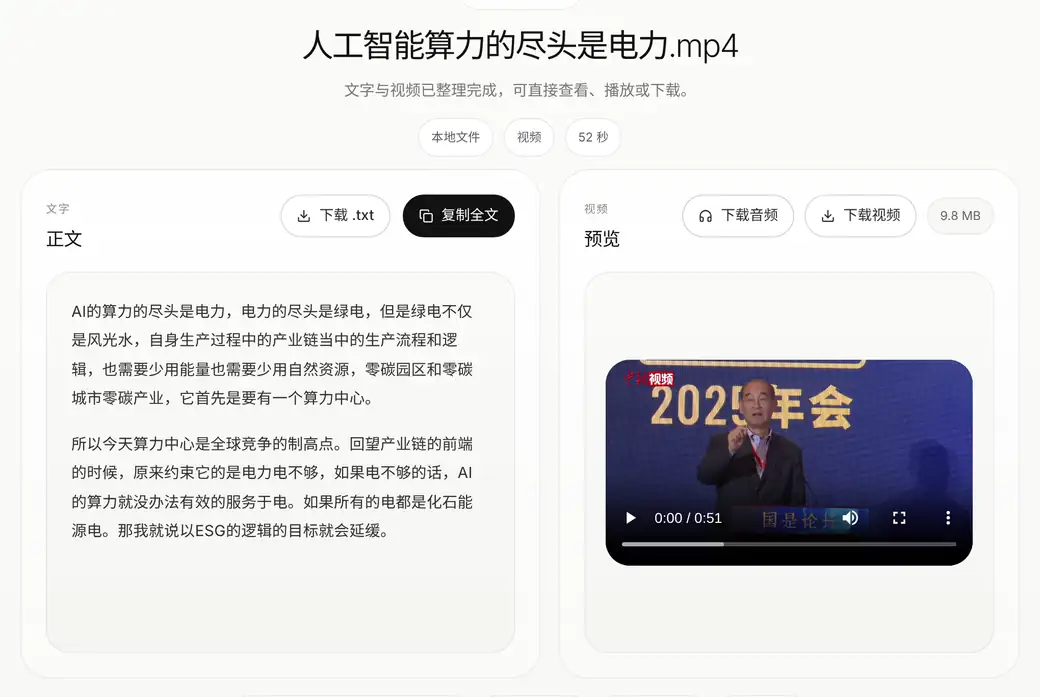
Your original, changed only as you decide
AI proofreading flags only clear errors; you confirm each one and save a separate proofread copy, and the original is never touched. A model cannot guarantee meaning, so the last step is yours.
The detailsScope, How it’s built, Trade-offs, Timeline, Evidence
Scope
Does
- Transcribe audio and video
- Extract article text and images
- Preview and download original video, audio, images and text
Does not
- Accounts
- Payments, plans or credits
- Workspaces or an agent console
- A platform-style settings center
How it’s built
Desktop shell
- Tauri 2 (Rust) + React
- First run fetches only what it needs, about 222 MB
- Runtime packs verified by SHA-256
Local service
- FastAPI, launched with the app
- Listens only on a random local port
- A short-lived token per launch
- Progress streamed over SSE
Get the text
- Platform subtitles → page text → transcription
- If subtitles or text exist, skip transcription
- Video: fetch the audio first and deliver the text; the original video follows in the background
Transcribe
- SenseVoice on CPU by default
- CUDA on an NVIDIA GPU, when there is one
- CPU and GPU runtimes in separate processes
There is only the Windows app: fetching and transcribing both happen on your own computer.
Trade-offs
SenseVoice by default
WhyOn a CPU, SenseVoice runs at a real-time factor of about 0.035 (an hour of audio in about two minutes) versus about 2.01 for Faster-Whisper medium. On the same 72 hand-transcribed clips, both on a GPU, three rounds: Mandarin character error rate 12.75% for SenseVoice and 37.50% for Whisper medium, in 23 s against 138 s
Given upA bigger default model
Use subtitles and page text when they exist
WhyThe fastest transcription is the one you skip
Given upTranscribe everything
Text first, original video in the background
WhyAll 4 old timeouts were waiting for the whole original video (a 260 MB sample) before transcription; with the change, the same links ran three rounds with no timeouts
Given upWait for the video, then transcribe
The background video keeps the original quality
WhyThe split streams alone are faster, but the same video came out at 854×462 instead of the original 1280×692
Given upTrading resolution for speed
Read Xiaohongshu’s structured page data directly
WhyNo full-page HTML: transfer fell from 521 KB to 2 KB and total time by 30–40%
Given upFetch the page, then parse it
Do three things only
WhyAccounts, payments and workspaces turn a tool into a platform
Given upBecoming a platform
Timeline
- Step 1Get it running in the command line: install FFmpeg, download a transcription model, until the first text came out
- Step 2Give it a good interface, modelled on Apple’s design
- Step 3Pull images and text from Xiaohongshu and other platforms too, without their watermarks
- SinceRework it again and again until it was stable
- 2026.10.23v2.3.0: AI proofreading, GPU acceleration, an estimate of the time left; video text first, the original in the background
Evidence
- A live smoke test with real samples on 2026-08-11: Bilibili, Xiaoyuzhou, Douyin and WeChat articles passed; a Xiaohongshu post with 15 images and 14 Live clips passed.
- 2026-10-21: five platforms, 60 links, three rounds each. 137 of 180 runs delivered in full and 4 timed out, so 2.3 was held back.
- 2026-10-22, after the fixes, the same links over three rounds: 141 delivered in full, no timeouts. Bilibili 57/57, WeChat 30/30, Xiaoyuzhou 27/30, Douyin 24/30, Xiaohongshu 3/33; every failure stays in the count.
- Accuracy: on the public ASCEND corpus (hand-transcribed Hong Kong conversations in Chinese and English), the GPU build of SenseVoice scored a Mandarin character error rate of 9.31%, an English word error rate of 23.34% and 15.52% on mixed speech (5,735 clips, three rounds each).
- The v2.3.0 installer was accepted on his own PC and then on a clean Windows machine; the file released is that same file, and a download from the website matches its SHA-256.
- Each platform’s status is published with the date of its last check, not as a permanent promise.
- Installers, runtime packs and release files all carry SHA-256; GitHub Actions also produces an SBOM and build provenance.
Still missing
- The installer is not code-signed yet, so Windows shows a warning.
- 39 of the 180 runs still failed: 10 old Xiaohongshu links without their share parameters can’t be read; for 2 Douyin posts the share API returns nothing, for reasons not yet known, so signing in isn’t a proven fix; 1 Xiaoyuzhou episode has no readable content.
- The English error rate is still high. The test corpus is Hong Kong conversation; it can’t stand in for dialects, background music or every long video. The CPU build uses different weights and hasn’t been tested at the same scale.
- Windows only.